Apply for Tow Driver ID Badge Online
Every person who drives a tow truck in Palm Beach County 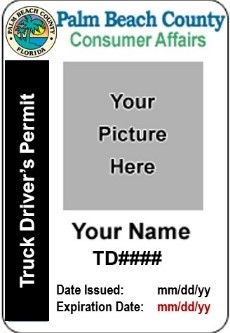 is
is required to conspicuously display a badge that looks like this while working. This badge shows law enforcement and the public who the driver is and means the driver has passed both a criminal and driving background check. Law enforcement and the public have a right to examine the I.D. Badge.
is
is required to conspicuously display a badge that looks like this while working. This badge shows law enforcement and the public who the driver is and means the driver has passed both a criminal and driving background check. Law enforcement and the public have a right to examine the I.D. Badge.
The Division of Consumer Affairs is responsible for processing applications for persons required to obtain a Tow Driver ID Badge. Persons required to obtain a Tow Driver ID Badge should do so using the online portal linked below. The portal can accommodate new and renewal applications and replacement requests. The portal allows applicants to submit a complete application including required forms, and payment of fees.
The portal works best with a desktop or laptop computer with Google Chrome as the web browser.
Mobile devices such a Tablets, Smartphones and iPads may not work.
APPLICATION FEES ARE NON-REFUNDABLE.
*************
IMPORTANT: YOU MUST FOLLOW THESE INSTRUCTIONS WHEN APPLYING FOR TOW DRIVER ID BADGE
-
To apply online for a Tow Driver ID
Badge, click the link below:
Apply for Tow Driver ID Badge
OR click on the GREEN BUTTON Þ

-
Enter your e-mail, first name, last name, and select
“Sign-up"
-
Click on the “Sign-up" link in the lower left portion
of the screen
-
Check your email for a temporary account password
|
- To apply online for a Tow Driver ID Badge
AND if you have an online login account, click the link below:
Apply for Tow Driver ID Badge
OR click on the BLUE BUTTON Þ

-
Enter your User Name
-
Enter Password
-
Select "Login"
Note: there is a "Forgot Password" link at the bottom of the
page if you have an online portal account but can't remember
your password.
|
|
|
Non-Refundable Fees to obtain a Tow Driver ID Badge may be made within the portal and are as follows:
-
$84 – This includes the application fee and the Florida Department of Law Enforcement (FDLE) criminal history/records
-
$16.25– Florida Driving History Record from the Florida Department of Highway Safety & Motor Vehicles
-
$30 – Late Fee will be assessed for persons renewing after the badge expires
- $30 – Replacement Id Badge Fee
SHOULD YOU HAVE ANY QUESTIONS, PLEASE CONTACT US:
PALM BEACH COUNTY CONSUMER AFFAIRS
561-712-6600
*
50 SOUTH MILITARY TRAIL, SUITE 201
WEST PALM BEACH, FL 33415
|